Successful migrations of Oracle Access Manager (formerly COREid) configuration data rely heavily on consistent directory naming of entries between envionments. It is not enough for configuration data objects to share the same user friendly names, they must have the same RDN (Relative Distinguished Name) values in the directory server. This forms the basis of clean migrations. As well, objects must share the same properties. If this setup is performed in advance of using the COREid Migration Service or alternatively, corrected in a pre-existing environment using the COREid Migration Service migrations will run smoothly. The situation described below illustrates how having inconsistent environments can cause problems.
After copying a policy domain or policy to a new environment the resources protected by the policy domain and/or policy are not actually protected there. Checking the resources in the Oracle Access Manager Access Tester reveals that the resources are indeed not protected.
This error highlights a mismatch in host identifier data between the source and target environments. It may look the same (i.e. have the same user friendly description in the UI), however, the distinguished name (DN) that names the object in the directory is probably different.
The short term solution is to add the host identifier for that environment in all of the locations in the policy domain(s) and/or policy(ies) where resources are specified. This will get the policy domain(s) and or policy(ies) working again in the target environment. However, there is still a longer term problem that will affect future migrations of policy domain data.
This long term solution is to use the COREid Migration Service to migrate host identifiers and policy domains from a stable environment (production) to all of the other evironments (i.e. quality, test and dev) and systematically update the host identifier entries with host names specific to the environment. This will make the other environments consistent a prevent this problem from occurring in the future.
Thursday, October 19, 2006


Anonymous Authentication Resources SLOW
Problem Oracle Access Manager (formerly COREid) is extremely slow or does not serve content from servers protected by the Anonymous Authentication Scheme (formerly Netpoint None). This can include FAQ pages, login pages, images, style sheets, etc.
Background The Anonymous Authentication scheme is used in cases where the WebGate has its DenyOnNotProtected property set to TRUE. The anonymous authentication scheme maps the OblixAnonymous user int eh credential_mapping plugin. By default this is mapped to the uid attribute. The uid attribute is indexed by default in some directory servers but not in AD/AM. In AD/AM the attribute is added as part of the iNetOrgPerson schema extension and is not indexed.
Solution If you are having a problem similar to this one, check to see if the Anonymous Authentication scheme is using the uid attribute in teh credential_mapping plugin. If it is then check to see if the attribtue is indexed in the directory server (if using AD/AM it will not be indexed by default). If it is not indexed then there are a couple of options:
Potential Cause How did this problem occur? It seemed to just appear over night. The likely cause of this problem is an increase in the amount of data in the user directory server. More data will cause a search on an unindexed attribute to yield incorrect incomplete results more frequently than if there is less data in the directory. This is because the look thur limit the directory imposes on the searhcing user may be exhausted before the entry (or entries) is located.
Background The Anonymous Authentication scheme is used in cases where the WebGate has its DenyOnNotProtected property set to TRUE. The anonymous authentication scheme maps the OblixAnonymous user int eh credential_mapping plugin. By default this is mapped to the uid attribute. The uid attribute is indexed by default in some directory servers but not in AD/AM. In AD/AM the attribute is added as part of the iNetOrgPerson schema extension and is not indexed.
Solution If you are having a problem similar to this one, check to see if the Anonymous Authentication scheme is using the uid attribute in teh credential_mapping plugin. If it is then check to see if the attribtue is indexed in the directory server (if using AD/AM it will not be indexed by default). If it is not indexed then there are a couple of options:
- index the attribute in the directory (may be harder on some directory platforms than others; very easy on AD/AM)
- change the attribute in the Anonymous Authentication Scheme's credential mapping step to an attribute that IS already indexed
Potential Cause How did this problem occur? It seemed to just appear over night. The likely cause of this problem is an increase in the amount of data in the user directory server. More data will cause a search on an unindexed attribute to yield incorrect incomplete results more frequently than if there is less data in the directory. This is because the look thur limit the directory imposes on the searhcing user may be exhausted before the entry (or entries) is located.
Friday, October 6, 2006
Can't See Workflow
Successful migrations of Oracle Access Manager (formerly COREid) configuration data rely heavily on consistent directory naming of entries between envionments. It is not enough for configuration data objects to share the same user friendly names, they must have the same RDN (Relative Distinguished Name) values in the directory server. This forms the basis of clean migrations. As well, objects must share the same properties. If this setup is performed in advance of using the COREid Migration Service or alternatively, corrected in a pre-existing environment using the COREid Migration Service migrations will run smoothly. The situation described below illustrates how having inconsistent environments can cause problems.
Have you ever copied a workflow definition from one environment to another and had the workflow not appear in the Oracle Access Manager (formerly COREid) Workflow applet? You double check the target directory server and indeed all of the entries are there so you wonder what could possibly be happening.
If this sounds familiar, then this is likely highlighting a difference between your two environments that you might not know existed. The problem is probably related to when your environments were first built manually independent of one another.
The cause is that there are different objectclasses associated with the tab_id that the workflow is meant to manage.
For instance say in the development environment the Employees tab (default user tab in Oracle Access Manager) has associated with it structural objectclasses of user and oblixOrgPerson. But in the quality assurance environment where you migrated the work flow to it has objectclasses of user, obligOrgPerson and auxCompanyPerson.
This provides an obvious barrier to performing clean migrations between environments. The way to correct this problem is to make the objectclasses look the same. The best way to do this is to get one environment in a pure state (i.e. contains all of your active development) and then migrate it to the other environments. This way all of the environments will be the same and ready to migrate information from one environment to another.
Have you ever copied a workflow definition from one environment to another and had the workflow not appear in the Oracle Access Manager (formerly COREid) Workflow applet? You double check the target directory server and indeed all of the entries are there so you wonder what could possibly be happening.
If this sounds familiar, then this is likely highlighting a difference between your two environments that you might not know existed. The problem is probably related to when your environments were first built manually independent of one another.
The cause is that there are different objectclasses associated with the tab_id that the workflow is meant to manage.
For instance say in the development environment the Employees tab (default user tab in Oracle Access Manager) has associated with it structural objectclasses of user and oblixOrgPerson. But in the quality assurance environment where you migrated the work flow to it has objectclasses of user, obligOrgPerson and auxCompanyPerson.
This provides an obvious barrier to performing clean migrations between environments. The way to correct this problem is to make the objectclasses look the same. The best way to do this is to get one environment in a pure state (i.e. contains all of your active development) and then migrate it to the other environments. This way all of the environments will be the same and ready to migrate information from one environment to another.
Monday, September 11, 2006
COREid Migration Service
Although we are continuing our invitation only pre-beta phase, all are welcome to peruse the information now publicly available.
https://extranet.nulli.com/migration/
https://extranet.nulli.com/migration/
Thursday, August 17, 2006
COREid Migration Service Preview
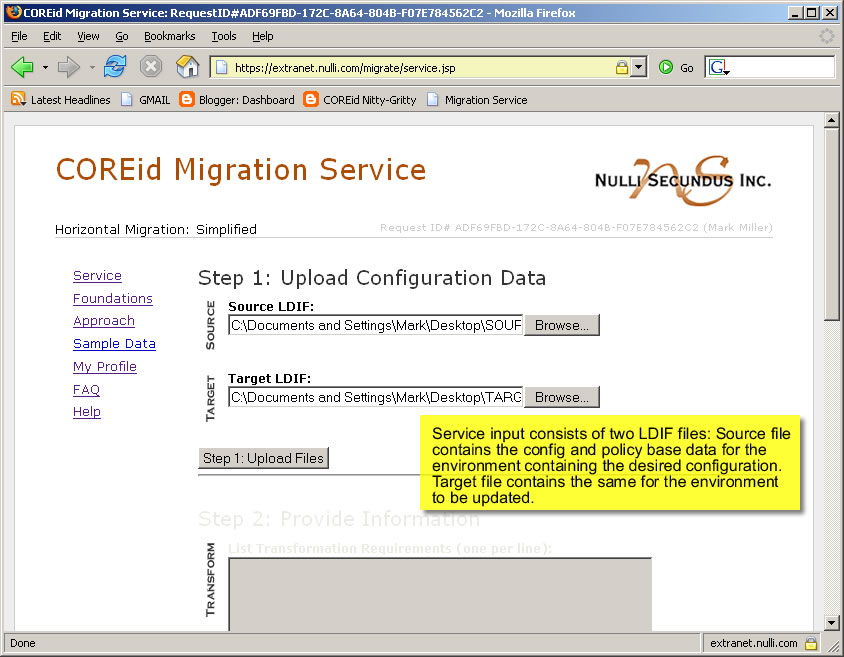
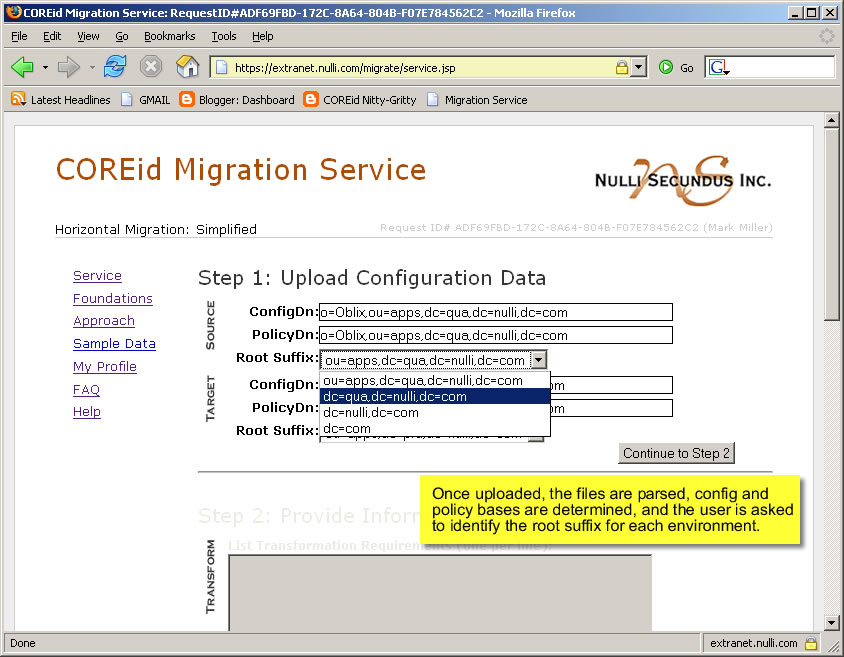
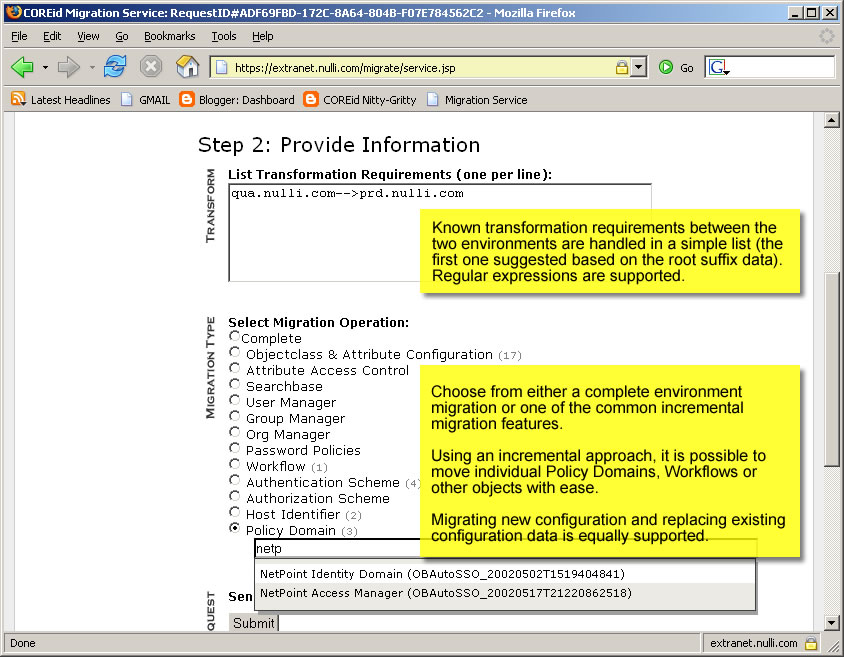
For the folks that have been wanting a closer look at the migration service here is a quick run down with screen shots.
This should give you a pretty good idea what this is looks like.
The Nulli Professional Services team is using this in the the field today and our pre-beta invitees are taking their first steps on their own.
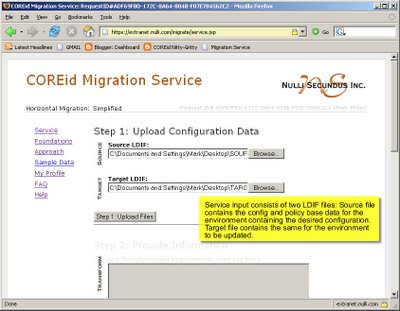
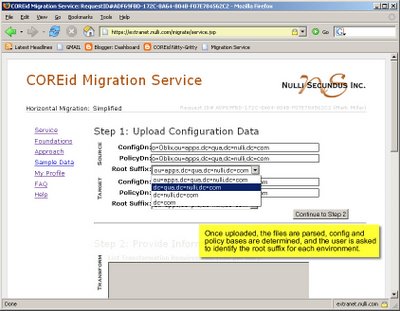
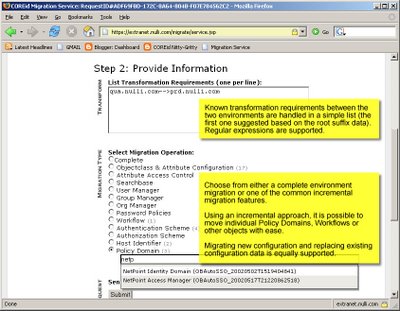
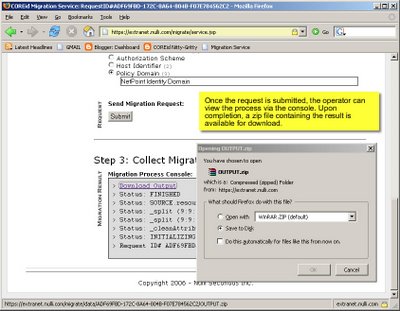
Thanks for your interest so far.
This should give you a pretty good idea what this is looks like.
The Nulli Professional Services team is using this in the the field today and our pre-beta invitees are taking their first steps on their own.

Thanks for your interest so far.
Saturday, July 22, 2006
COREid Migration Service Enters Pre-Beta Phase
Nulli Secundus is pleased to announce that our COREid Migration Service has entered a pre-beta (invitation only) phase. We are currently inviting a small group of Nulli customers to begin to use the tool.
The COREid Migration Service is a Nulli hosted web application to which users may upload COREid configuration data in LDIF format. The service processes the data from the source and target environments and returns a single LDIF file suitable for import into the target system. The goal of the Migration Service is to support COREid administrators in duplicating COREid Identity and Access application behavior across separate COREid installations.
The COREid Migration Service will be available at no cost to registered users.
If you would like to be notified upon general release of the service or if you would like to be considered for the pre-beta invitee pool, please send an email stating your interest to mark at nulli dot com.
The COREid Migration Service is a Nulli hosted web application to which users may upload COREid configuration data in LDIF format. The service processes the data from the source and target environments and returns a single LDIF file suitable for import into the target system. The goal of the Migration Service is to support COREid administrators in duplicating COREid Identity and Access application behavior across separate COREid installations.
The COREid Migration Service will be available at no cost to registered users.
If you would like to be notified upon general release of the service or if you would like to be considered for the pre-beta invitee pool, please send an email stating your interest to mark at nulli dot com.
Thursday, July 20, 2006
Create Clean Schema File from AD/AM
Have you ever wanted to get a nice clean schema file containing all of your custom attirbutes and object class entries but exluding the special microsofty attributes from and AD/AM (or AD) instance so that you can archive it off into a source control system or just simply migrate it to another environment? You dread the task becuase you never took the time to automate it so you always edit the file by hand. Well here is a simple regex that you can use to clean up the file after you extract it. The regex as written works in editplus (by far the best editor I have ever used, come on buy it, you know you want to), but can can be easily tweaked to work in other editors, scripts, etc.
Anyway, there are three steps...
Anyway, there are three steps...
- Extract your data... here is the ldifde way
ldifde -f {filename} -s {server} -t {port} -d "CN=schema,CN=configuration,CN={adam_guid}" -r {custom object searhc filter} - Prune the unwanted attributes
In the following section it should all be read as a single regex (ignore line breaks). It should be used in a substitution statement where nothing is substituted for the match.
^(distinguishedname|instancetype|whencreated|whenchanged|
usncreated|usnchanged|name|objectguid|schemaidguid|objectcategory|msds-intid)
::? [^\n]*\n( [^\n]+\n)*
- Replace the AD/AM GUID to make it really easy to import into a target environment change the GUID in the file to something easy to type that is not repeated elsewhere in the file.
Subscribe to:
Posts (Atom)